Deep Research
AdaL conducts deep, multi-source research and produces comprehensive, well-cited reports. Unlike standalone tools (like OpenAI Deep Research), AdaL combines live web search with your local project context to solve highly specific engineering and research problems.
Quick Start
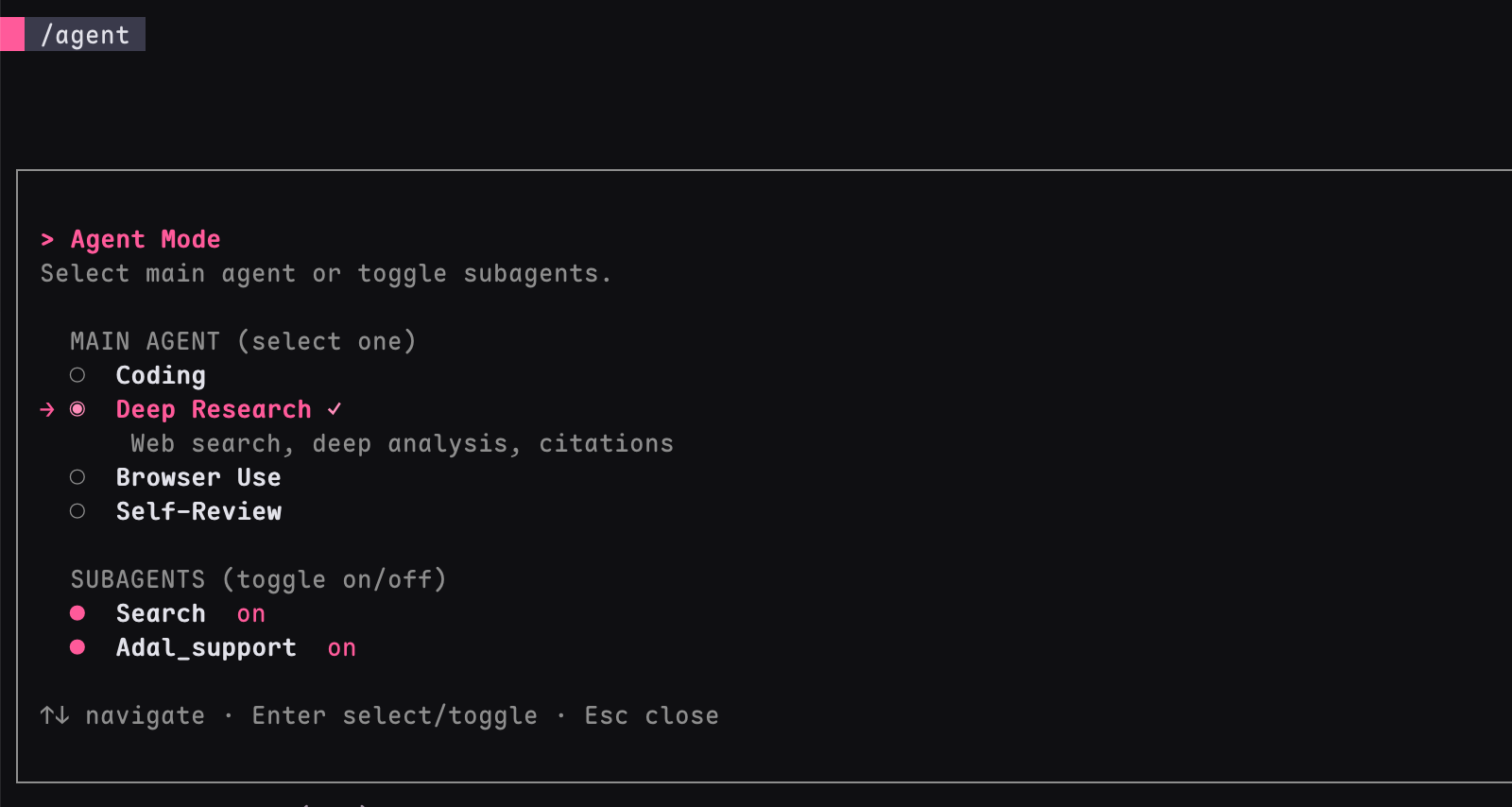
- Type
/agentto open the Agent Mode selector. - Select Deep Research.
Key Advantages
- Context-Grounded Research: Merges your local codebase and files with live web searches.
- GitHub Deep Analysis: Ask AdaL to clone and deep dive into relevant Git repos to map out architectures and source code.
- Auto-Illustrations: Need diagrams or visuals in your report? Just ask AdaL to "add illustrations" and it will generate them using the Nano Banana image model.
Research Depth
AdaL automatically adapts to your query's complexity:
| Depth | When | What You Get |
|---|---|---|
| Quick | Factual questions, narrow scope | A few searches, concise answer |
| Standard | Comparative analysis, multi-faceted questions | Research plan + structured report |
| Deep | Emerging fields, landscape surveys, contested topics | Exhaustive plan + comprehensive report with many sources |
Tip: You can manually nudge AdaL (e.g., "Give me a comprehensive landscape analysis..." or "Quick summary of...").
What to Expect
For substantial queries, AdaL executes a multi-step workflow:
- Research Plan: Creates a dynamic outline (
[topic]_plan.md) in your working directory. You can edit this early to steer the direction. - Investigation: Iterates through multiple rounds of searching, reading full articles, and cross-referencing sources.
- Structured Report: Writes a final report (
[topic]_report.md) section by section. Every factual claim is cited, generating a traceable References section at the bottom.
Starter Prompts (Copy-Paste)
If you’re new to Deep Research, start with one of these prompts and then refine based on the first output.
1) Quick Landscape Scan
Research the current landscape of AI coding agents in 2026. Cover major tools, key differences, and recent trends. End with a concise comparison table.
2) Engineering Decision Support
Compare RAG vs fine-tuning for a customer-support assistant. Focus on implementation complexity, cost, latency, maintenance, and quality tradeoffs. Recommend when to use each.
3) Codebase + Web Context
Use my current project context and public sources to propose 3 architecture improvements for reliability and developer velocity. For each, include expected impact, risk, and rollout steps.
4) Real-World “Day-One” Prompt (Raw)
help me understand the code base and which model would work best for UI UX improvements
This kind of prompt is intentionally messy—and that’s okay. Deep Research can still produce useful output from rough input. You can always refine scope and format after the first pass.
Sample Output Shape (What “Good” Looks Like)
A strong Deep Research response usually includes:
- Executive Summary (short answer first)
- Method / Scope (how information was gathered)
- Findings by Theme (clear sections)
- Tradeoffs and Recommendations
- References (linked sources for key claims)
Tip: Ask for a format directly, e.g. “Return this as: Executive Summary, Findings, Recommendation Table, References.”
Tips for Better Results
- Write Specific Prompts: "Compare RAG vs fine-tuning for medical Q&A, focusing on accuracy and cost" is better than "Tell me about RAG".
- Guide the Scope: Specify time ranges ("from 2023 to present") and target audience ("for a technical blog").
- Ask for Revisions: Follow up with "Expand the section on retrieval augmentation" or "Add a comparison table".
Example Queries
- Technology Survey: "Research the current state of WebAssembly adoption in production systems"
- Comparison: "Compare PostgreSQL, CockroachDB, and TiDB for distributed OLTP workloads"
- Codebase Strategy: "Compare RAG vs fine-tuning for our specific data pipeline"
- Repo Analysis: "Deep analyze the source code of [GitHub Repo] and summarize its architecture"